Insights Hub Articles
Paper meets digital: creating smooth workflow transitions


Turn paper into data with smart scan, OCR and cloud print
Whether you run operations, IT or compliance, the challenge is universal: how do you bridge the gap between paper processes and digital systems without losing time, accuracy or control?
Cloud print adoption is rising as firms simplify infrastructure, hybrid working exposes friction between physical paperwork and digital collaboration, and OCR technology has become both sharper and easier to deploy at scale.
The reality is that even digital-first businesses still encounter paper at key touchpoints: signed contracts, supplier invoices, delivery notes, regulatory forms. When those documents remain disconnected from your core systems, productivity suffers.
The opportunity lies in connecting MFP capture, smart scan with OCR, and cloud print to your document management software so workflows without friction. Kyocera Document Solutions helps teams make that shift by delivering document management software, secure MFP capture and cloud printing solutions that transform paper hand-offs into governed digital records with complete audit trails.
Let’s explore how.
The cost of disconnected paper and digital workflows
Even in organisations that pride themselves on digital transformation, certain workflows still begin with paper. Signed forms arrive by post. Suppliers send paper invoices. Field teams return handwritten notes. Customers present physical receipts. Each of these touchpoints creates a gap that manifests as operational friction.
- Retyping and duplication
When documents aren't captured digitally at source, staff manually re-enter information into systems. This wastes time, introduces errors, and creates duplicate versions across email, shared drives and local folders. - Missing audit trails
Paper that sits in filing cabinets or personal desks doesn't carry metadata, version history or access logs. When audit or compliance teams need proof of activity, the trail goes cold. - Slow retrieval and decision-making
Searching for information across physical archives and disconnected digital folders delays approvals, customer responses and reporting. Teams spend hours hunting for documents that should surface in seconds. - Security and governance blind spots
Untracked paper creates risk. Without knowing who accessed, edited or shared a document, organisations struggle to demonstrate control—particularly when regulations demand transparency and data protection. - Bottlenecks in hybrid work
When some team members work remotely and others handle paper on-site, handoffs become friction points. Scanning, emailing and downloading create detours that slow collaborative workflows.
Productivity improves when paper becomes searchable, shareable data.”

How smart scan, OCR and document management software close the gap
Closing the paper-to-digital gap starts with capturing documents at source and applying the same governance rules you use for born-digital files. Modern MFP technology makes this practical and scalable.
- MFPs with smart scan capabilities:
Today's MFPs do more than print and copy. They act as intelligent capture devices. Kyocera MFPs allow users to scan directly from the device into a governed repository, applying templates that assign metadata, ownership and retention policies at the point of capture. Simple on-screen presets guide users through the process, reducing clicks and enforcing best practice by default.
Smart scan eliminates detours. Instead of sending the scan via email or to a local folder, users can choose a destination, such as a customer case, project file or supplier record, and the document arrives in the right place, ready for collaboration. - OCR for searchable, editable content:
OCR technology transforms scanned images into machine-readable text. Names, invoice numbers, dates, contract clauses: all become searchable and editable. This removes the need for manual retyping and makes historical documents just as accessible as newly created files.
Kyocera's smart scan integrates OCR at the point of capture, turning paper into structured data instantly. Teams can search across thousands of scanned documents as easily as they search email or cloud storage. - Document management software for governance:
Capture is only the first step. To close the gap completely, scanned documents need to live in a system that enforces permissions, tracks changes, and maintains audit trails. Kyocera Cloud Information Manager (KCIM) provides browser-based document management with encryption, version history and role-based access—creating one source of truth for both scanned and born-digital files. - Scan-to-cloud workflows:
Kyocera Cloud Capture (KCC) standardises the scan-to-cloud process. Authenticated users scan from the MFP, and documents flow automatically to the chosen repository with indexing and routing handled in the background. This removes manual steps, reduces errors, and ensures every scan is secure in the cloud from the moment it's captured.
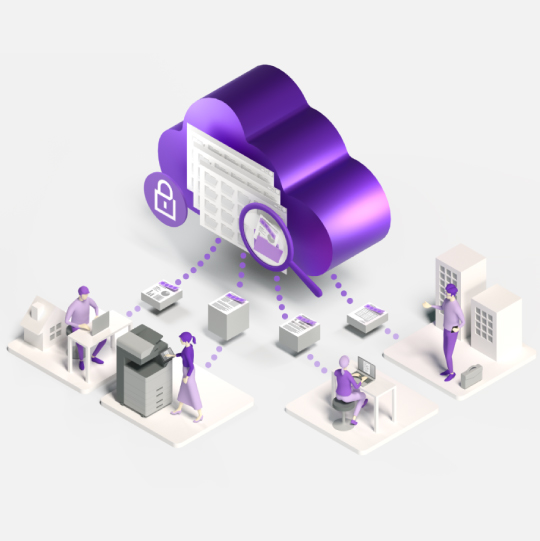
What is Kyocera Cloud Print and Scan?
Outcomes and benefits of cloud document management
Moving print and content services to cloud solutions delivers value across operational, financial, and strategic dimensions. These benefits compound over time, transforming infrastructure costs into predictable investments while strengthening both security and user experience.
- Faster access to information:
With OCR and cloud document management, teams search by keyword rather than file name. Finding an invoice, contract or compliance record takes seconds instead of minutes. This speeds approvals, customer service and reporting. - Reduced rework and errors:
Automatic metadata tagging and OCR remove the need for retyping. Information flows from paper into systems without manual intervention, cutting errors and freeing staff for higher-value work. - Complete audit trails:
Every scan, edit and access event is logged. When regulators, auditors or internal teams need proof of activity, the audit trail provides a complete, time-stamped record. - Hybrid-ready collaboration:
Cloud document management and cloud print enable seamless work across locations. Remote teams access scanned files via browser, and on-site staff print from the cloud without desktop software. MFPs become shared resources that support distributed collaboration. - Stronger security and governance:
Role-based permissions, encryption and centralised storage replace the risk of paper left on desks or files scattered across drives. Document management software enforces who can view, edit or share. - Easy third-party cloud storage integration:
You can easily print from or scan to connected third-party cloud storage, such as Box.com, Google Drive and OneDrive. This means no bottleneck if you are using these cloud storage solutions; our software allows you to seamlessly complement your existing document workflow.
Want practical help mapping risks and closing gaps?
Our experts can help you pilot cloud printing and cloud document management with data protection by design, robust audit trails and secure document storage that works for your people.
Discover the tools you need for hybrid working
Equip teams to collaborate securely from anywhere.
Improve capture with cloud-ready workflows
Practical ways to standardise scan-to-cloud and speed retrieval.
Why ECM is key for modern business success
Structure, search and share content efficiently with streamlined control and smarter workflows built in.
FAQ
Learn more about us
What’s the difference between smart scan and regular scanning?
Regular scanning produces static image files. Smart Scan adds templates, destinations and OCR, so documents become searchable and automatically route to the correct location.
Do we need new hardware to use OCR and cloud print?
Not always. Most Kyocera MFPs support KCC for scan-to-cloud and KCPS for cloud printing, meaning many enhancements come from software rather than hardware. Your Kyocera partner can confirm device compatibility.
Is scanned and printed content secure in the cloud?
Yes. Kyocera’s cloud services use encryption, role-based access and secure release workflows, ensuring scanned and printed content remains protected and governed end-to-end.
 Printer